
Centralized document management means managing documents kept in different applications and folders from a shared content infrastructure. The goal is not just to move files to the same place. It is to be able to track the current version of a document, who can access it, which transaction it belongs to and the changes made over time, all together.
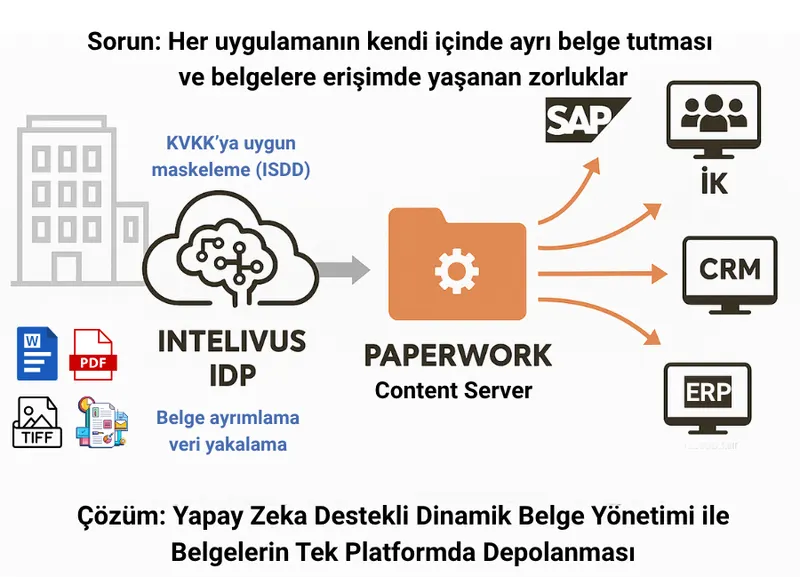
A contract on the legal team's computer, its signed copy in email and the payment attachments in the ERP is an everyday example. As this setup grows, finding the right file becomes harder. PaperWork Document Management and Content Server lets these documents be managed under common rules and used from the related applications.
The difference between a shared folder and centralized document management
A shared folder can be used to share files. But a folder structure alone is not always enough for document types, version relationships, access roles and activity history. In centralized management, a document is linked to a customer, supplier, project, contract or process record. This way, users can reach the right document without knowing the file name.
For example, while one employee edits the draft of a contract, another employee may be using the approved version. These two versions must not get mixed up, the change history must be preserved and unauthorized people must not access the draft. Document management handles these rules in a broader scope than the folder where the file sits.
Which controls should a centralized setup have?
- Classification: The required fields for invoices, contracts, personnel files and technical documents should be defined separately.
- Version control: The current document should be clearly identifiable; previous versions and changes should be traceable.
- Access permissions: View, edit, download and share permissions should be set according to business needs.
- Search: It should be possible to search by document type, date, organization or project, and to use full-text search on suitable content.
- Activity history: Access and change records for a document should be monitored according to the organization's audit needs.
- Retention and archiving: The document's usage period, archiving and owners of subsequent actions should be defined.
How do ERP, CRM and other applications connect?
Centralized management does not mean every employee has to abandon the business applications they use. A user who opens an invoice in the ERP or a customer record in the CRM can use the related document in the same business context, provided they have the necessary permission. The aim is to access a shared record instead of keeping a separate copy of the document in each application.
PaperWork's enterprise integration capabilities cover needs such as saving documents from applications, using document information and starting workflows. In the project, you should decide which system is the master data source, how the document ID will be carried and how access permissions will be enforced. You can also review document use within SAP on the document management for SAP page.
Example: Shared management of a supplier contract
The flow below is a sample scenario showing how centralized document management can be set up:
- The procurement team brings the contract into the system, linking it to the supplier record.
- The legal team reviews the draft within its permissions. Changes are tracked as new versions.
- The document is sent to the related approval workflow; pending tasks and owners become visible.
- The approved or signed document is stored together with the related record. The finance team accesses the version it needs.
- Subsequent access, changes and renewals are tracked through the same document history.
For tasks that require mobile access, the same document ID and access rules should be preserved. If there are needs such as e-signature and KEP (Turkish registered electronic mail), these can be included in the relevant steps of the document flow. The services to be used, permissions and integration scope should be defined separately during the project.
Where does artificial intelligence fit into this setup?
Document management and automated document processing are different tasks. While Content Server manages the storage and use of documents, Intelivus intelligent document processing can be used to classify documents and extract the required fields. With the verified information, the document can be linked to the appropriate record or an approval workflow can be started.
For documents containing personal data, masking and authorized viewing should also be considered. Automation does not mean every document will be processed without control; user review can be defined for missing or suspicious information. Document security should be addressed together with the organization's access and data processing policies.
Where should you start the move to a centralized setup?
First, choose the most frequently used document group. Map out which systems this group lives in, how many different copies are kept, who uses them and which processes they relate to. Then define the classification fields, access roles and integration needs.
In the pilot, measure the time to find documents, use of the wrong version, the number of missing fields and whether users can complete their work. When migrating old documents, check not only the files but also the necessary document information and version relationships. For other criteria to use when choosing a product, see the guide to choosing a document management system.
Frequently asked questions
Are all documents kept in the same folder?
No. Centralized management means a shared infrastructure and shared rules. Departments can have different document classes, fields and access permissions.
Does centralization ensure legal compliance on its own?
Not on its own. Access controls and record tracking support compliance efforts; decisions on data processing, retention and sharing must be made separately by the organization's responsible parties.
Can the existing ERP or CRM continue to be used?
Yes. With suitable integrations, documents can be used from within existing business applications. The connection method and supported operations are evaluated based on the existing infrastructure.
Content update: PaperWork, September 6, 2026. Related articles on centralized document management have been brought together in this guide.
Related images and videos
Source
Would you like to see PaperWork in your organization?
Request a Demo

