
The Real Process Flow Is Invisible
The designed process and the process that actually runs are not always the same. PaperWork Process Intelligence makes deviations, rework loops, alternative paths and repeated steps visible.
PaperWork Process Intelligence continuously analyzes bottlenecks, deviations, workload imbalances, risks and the root causes of problems using real process data. It turns AI-powered improvement recommendations into tasks, notifications or workflows with a single click, making continuous improvement possible.
In many organizations, even when processes are digitized, their real performance cannot be clearly seen. Work gets done, forms circulate and approvals are obtained, yet the causes of delays, rework, workload imbalances and costly steps often go unnoticed.
This lack of visibility leads to longer processing times, unnecessary workload, deadline risks, customer dissatisfaction and a loss of operational control.
PaperWork Process Analytics reveals how your processes actually work. It detects bottlenecks, deviations, rework and risks, and analyzes not only where problems occur but also why.
PaperWork Process Intelligence makes the answers to these questions visible through real process data and helps you identify the right actions for improvement.
PaperWork interprets process activity through the questions management wants answered: Where are we losing time, why are we delayed and which issue should we address first?
Six items are waiting at the same approval step
Share of procurement time spent waiting
Request completion time: 20.5 hours
The sample procurement process takes 20.5 hours to complete, 18 of which are spent waiting for manager approval. The animation shows the step where time is lost.
The designed process and the process that actually runs are not always the same. PaperWork Process Intelligence makes deviations, rework loops, alternative paths and repeated steps visible.
Waiting times and workload pile-ups are often noticed only after the process is already delayed. The system continuously analyzes bottlenecks and workload imbalances between teams to provide early warning.
You can see where a delay occurs, but often not why. Artificial intelligence analyzes process data to uncover the root causes of delays, errors, rework and performance losses.
Deadline risk, SLA and KPI deviations, error density, open workload and bottleneck signals are monitored in real time, so you can intervene before problems grow.
Automating every process or every step does not create the same value. PaperWork uses real data to identify where automation will deliver the greatest gains in speed, cost and efficiency.
Analysis results do not stay in reports. AI-powered recommendations become notifications or improvement tasks with a single click, and their results are measured to drive continuous improvement.
Records and values in the visuals are representative.
PaperWork Process Analytics analyzes process data across approximately 120 parameters with artificial intelligence to uncover bottlenecks, workload imbalances, deadline risks, deviations and the root causes of problems.
It runs simulations on historical data, generates an AI-powered process health report and offers the improvement recommendations with the highest impact.
It turns insights into notifications or tasks with a single click, making continuous improvement possible.
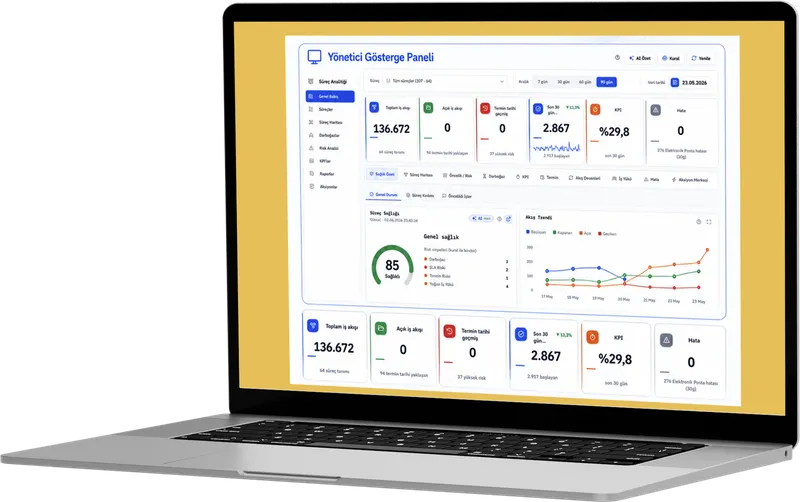
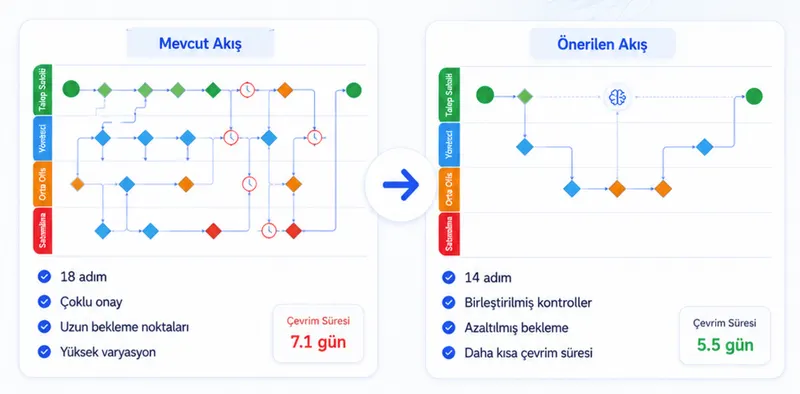
By running scenarios on historical process data, you can compare the likely impact of removing steps, changing routing or automating on completion time, workload and risk.
Results are estimates based on the scenario’s assumptions and should not be treated as actual outcomes.
PaperWork evaluates duration, workload, KPI, deadline, error and process path data together. Management no longer has to connect the dots between disconnected reports.
The records and values in the visuals are representative.
What happened in the process, why, and what should be done?
Management does not settle for seeing what happened in the month-end report. It is alerted while delay and KPI risks are forming, turns recommendations into tasks and uses the same indicators to track whether a decision worked.
Process Analytics is the analysis layer that uses data to show how an organization’s business processes actually run. PaperWork Process Analytics processes data from workflows and uncovers bottlenecks, deviations, delays, risks and improvement opportunities.
In many organizations, even when processes are digitized, it is not clear where they slow down, at which step they wait, which work carries risk and on which team the workload is piling up. PaperWork Process Analytics makes this invisible area visible and enables managers to make data-driven decisions.
No. PaperWork Process Analytics does more than produce reports. It analyzes process data, interprets it with artificial intelligence, offers improvement recommendations and can turn those recommendations into a task, notification or action flow with a single click. Analysis is thus directly linked to operational improvement.
Artificial intelligence analyzes bottlenecks, deviations, error density, deadline risks, KPI deviations and workload imbalances. The system answers not only “what happened?” but also “why did it happen, where should we intervene and which action delivers the greatest benefit?”
PaperWork analyzes waiting times and processing times at each process step, overdue work, P90 processing times, open workload and activity-based bottleneck scores. This makes it clear which step is slowing the process, where work is piling up and which activity should be improved first.
Organizations can define alert rules based on their own threshold values. When a deadline risk, KPI deviation, increase in errors, open workload, delay or bottleneck occurs, the system automatically generates an alert. Problems are seen the moment they occur, not in end-of-period reports.
Process simulation analyzes the workflow end to end using real process data. Artificial intelligence shows unnecessary steps, repetitions, waiting points and opportunities for simplification. Organizations can see the impact of a change on cycle time, workload and efficiency before implementing it.
Automating every process or every step does not deliver the right result. PaperWork Process Analytics uses real process data to show where automation will deliver the most value, so automation investments are prioritized by measurable impact rather than intuition.
It is suited to CIOs, operations managers, quality and continuous improvement teams, internal audit, compliance teams and digital transformation leaders. Every team can gain visibility, track risks, measure performance and manage improvement actions using the same process data.
PaperWork Process Analytics increases process visibility, detects bottlenecks early, monitors risks in real time, reveals workload imbalances, generates improvement recommendations with artificial intelligence and turns those recommendations into action. As a result, it grounds a culture of continuous improvement in real data.





Let’s explore how PaperWork’s low-code BPM, document management, ERP integration and AI solutions can be used in your organization.
We find a time that suits you.
We hold an introductory meeting.
We run a demo tailored to you.