
Turn Artificial Intelligence into Real Work with PWAI Assistant
PWAI Assistant embeds AI agents that specialize in different tasks into daily operations. One agent reads the document, another reviews the risk in a contract, and another interprets a delay in the process. They all work on the same platform, side by side with human teams.
The division of labor is clear. AI speeds up preparation, analysis and repetitive work. The human team weighs the context, handles exceptions and makes the decision.

PWAI Assistant Is the Platform Intelligence That Starts Processes, Interprets Risks, Monitors Metrics and Guides Users to Action.
For PaperWork, AI is not a module bolted onto products after the fact; it is a shared intelligence architecture that works inside the platform’s process, document, data and decision layers. PWAI Assistant is positioned as “Platform Intelligence”.
PaperWork’s AI journey began in 2021. At a time when AI was not yet as prominent in the enterprise software market as it is today, the company acquired an AI company based at ITU Teknokent, together with its source code and technical team. This was more than a technology acquisition. AI knowledge, experience and development culture were brought directly into the PaperWork organization.
The expertise built over more than five years in large language models, generative AI, Agentic AI, RAG and vector databases has become a shared intelligence architecture that spans the entire platform. It is not a standalone module or add-on. It draws on capabilities developed in AI solutions such as Intelivus, Query Insight and ISDD, and carries that know-how across PaperWork’s entire product family.
This is exactly where Platform Intelligence makes the difference: it turns AI from a tool you open separately into a natural part of everyday work.
AI works across different layers of the PaperWork platform.
PaperWork’s AI expertise is not tied to a single assistant. Standalone AI solutions, expert capabilities in ready-made products and platform-wide AI functions are all used within the same architecture. As a result, AI does not remain a separate application disconnected from the process where the work happens.
Standalone Solutions
Intelivus IDP processes documents. Query Insight answers questions over enterprise knowledge. ISDD is used for sensitive data detection and masking scenarios.
AI-Centered Platform Solutions
Solutions such as PWCLM, PWQMS, PWGRC, Case Management and Process Mining use AI capabilities in the context of their own business domains.
- PWCLMContract Lifecycle Management
- PWQMSQuality Management System
- PWGRCGovernance, Risk and Compliance
- PWITSMIT Service Management
- PWSpendProcurement Management
- Case ManagementCase Management
- Process MiningProcess Mining
In-Platform AI Capabilities
Starting work in natural language, designing forms and flows, summarizing documents, comparing versions and interpreting process data are all part of the shared infrastructure.
- Document SummarizationExtract Key Information Quickly
- RAG Question AnsweringAccess Your Knowledge in Natural Language
- Start Work in Natural LanguageGive an Instruction, Start the Work
- Process and Form DesignDesign Forms and Flows with a Prompt
- Version ComparisonSee the Differences Between Two Versions
- Process AnalyticsSpot and Fix Bottlenecks and Issues
They share the same work; responsibility and decisions stay with people.
PWAI Assistant interprets the user’s intent and the process context; it brings in the right expert agent, prepares the data and puts the possible actions inside the process. The user approves where needed, evaluates exceptions, makes the final decision and owns the work.
Human team
Sets priorities, evaluates the context of the work, handles exceptions and owns the responsibility.
PWAI Assistant orchestration
Interprets intent and context; brings in the relevant expert agent, prepares the data and connects the action to the workflow.
Expert AI agents
Perform the analysis and preparation required for a specific task such as documents, contracts, quality, risk or processes.
Not a single assistant, but an AI team that shares the work.
Instead of leaving a complex request to a single model, PWAI Assistant can break the work into parts. The Supervisor Agent understands the intent, plans the task, brings in the right expert agents and connects the result to the workflow. This way, search, document reading, comparison, compliance checks and process initiation run as separate specialties.
Supervisor Agent → planning → expert agent → validation → action
Task planning
Coordination
Result validation
Performs RAG-based search and source-backed Q&A over enterprise knowledge.
Starts defined workflows and tracks the related steps and work status.
Extracts defined fields from complex documents and prepares them for the next step.
Compares contract and document versions in terms of meaning and risk.
Helps check compliance against corporate standards, policies and rules.
Control layer: Agents work within user permissions, role-based access, workflow rules and, where needed, human approval. Exceptions and results remain traceable in the process context.
From documents to contracts, from quality to process analysis, different specialties at work.
The same platform intelligence works across different tasks such as data extraction, source-backed Q&A, contract analysis, quality and risk interpretation, process analytics, and form and workflow design.
Understanding and protecting documents
Reduces the manual preparation work between a document’s arrival and its archiving, and protects sensitive content based on permissions.
Classifies the document, extracts the required fields and prepares it for validation; it can transfer validated data to ERP/CRM or trigger a BPM process.
Classification · data extraction · validation · process startISDDDetects personal or sensitive data such as national ID numbers, IBANs and addresses. Presents a masked or authorized view of the same document based on the user’s role.
Detection · role-based masking · KVKK (Turkish Personal Data Protection Law) scenariosQuery InsightAnswers natural-language questions over enterprise files and knowledge sources, showing the document behind each answer so users can go back to the source.
RAG · source citation · corporate memoryContract intelligence
In PWCLM, AI does not reduce a contract to a single “risky / not risky” verdict; it runs different review tasks separately.
A justified, paragraph-linked risk assessment on a 0–100 scale.
Compares two versions at the level of meaning and risk, not just word differences.
Flags internal inconsistencies such as durations, amounts and missing clauses.
Quickly summarizes parties, amounts, durations and obligations by role.
Links each answer to the relevant contract clause.
Prepares alternative clause suggestions based on the approved playbook and clause library approach.
Quality, risk and supplier decision support
Speeds up the analysis, comparison and preparation work that comes before the expert makes the decision.
Helps investigate nonconformity causes with root cause, 5 Whys and fishbone approaches; interprets quality data, generates improvement suggestions and supports starting a CAPA in natural language.
Root cause · 5 Whys · fishbone · CAPAPWGRC risk intelligenceInterprets risk records and produces an AI Risk Report and risk commentary for management. The goal is not to change the risk owner’s decision, but to surface signals that need attention faster.
Risk commentary · reporting · early visibilityPWSLM contextual AISupports users with tasks such as extracting fields from documents, summarizing period-over-period changes in supplier scorecards, interpreting risk dimensions, suggesting validation questions for root cause, and comparing alternative suppliers with existing data.
Grounded suggestions · flags missing data · human approvalProcess and case intelligence
The system does not just answer “what happened?”; it also flags where delays, workload or deadline risks arise.
Interprets process metrics and explains bottleneck, deviation, workload and delay signals. Turns findings into readable recommendations and, when needed, starts the step to turn them into action.
Metric interpretation · root cause · action suggestionsCase ManagementBrings ownership, remaining time, delays, SLA and risk level together on the case card. The Predictive Risk & Deadline Pressure approach aims to surface deadline pressure earlier from existing signals.
Case context · deadline risk · operational controlPWSpendReads receipts and invoices with AI to reduce data entry; supports checks before approval and accounting with rules such as spending policy and irregularity controls.
Receipt reading · policy checks · irregularity checksMoving daily work forward in natural language
Users can take action within the context of their current work, forms and tasks without switching to a separate AI screen.
Can show open tasks and deadlines, understand a request given in natural language and prepare the related process to be started. It also provides access to daily work through channels such as Teams and WhatsApp.
Open tasks · natural language · process startAnalyzes previously completed work and identifies alternatives that can be applied at the user’s current process step. Once the user approves, it fills in the form and helps complete the work.
Past work analysis · alternatives · action after approvalCan summarize documents and support tasks such as tagging and version comparison; when an action is detected in a summary, it can go as far as suggesting a task.
Summary · tags · comparison · task suggestionAI Capabilities That Work Inside PaperWork
PWAI Assistant helps users get their daily work done faster and more easily. Users can ask the PWAI Assistant assistant a question or state what they need through Teams, WhatsApp or the mobile app.
- 1Ask in Natural LanguageWrite to the assistant through Teams, WhatsApp or the mobile app.
- 2PWAI AssistantUnderstands your intent and the context, and determines the right action.
- 3Results and ActionsLists open tasks, shows deadlines and starts the leave workflow; clicking a task opens it.
What tasks are assigned to me?
I’m going to the hospital tomorrow.
Describe what you want to do; let AI draft the form and workflow.
PWAI Assistant is more than an assistant that answers questions. It can design processes, build forms and produce analysis documents. The user makes the final edits with low-code tools, reviews the design and publishes it.
1. Describe the need in natural language
Design a 4-step leave approval workflow. The form should include Full Name, Employee ID, Department, Leave Type, Start Date, End Date, Number of Days and Description fields.
2. Get a form and process draft
- Full Name
- Employee ID
- Department
- Leave Type
- Start Date
- End Date
- Number of Days
- Description
PWAI Assistant interprets this text and creates the form fields, process steps, approval rules and workflow draft.
Workflows designed this way can also be turned into analysis documents that include form fields, flow diagrams, version information and technical details. This is especially useful for speeding up process documentation in sectors with strict validation requirements.
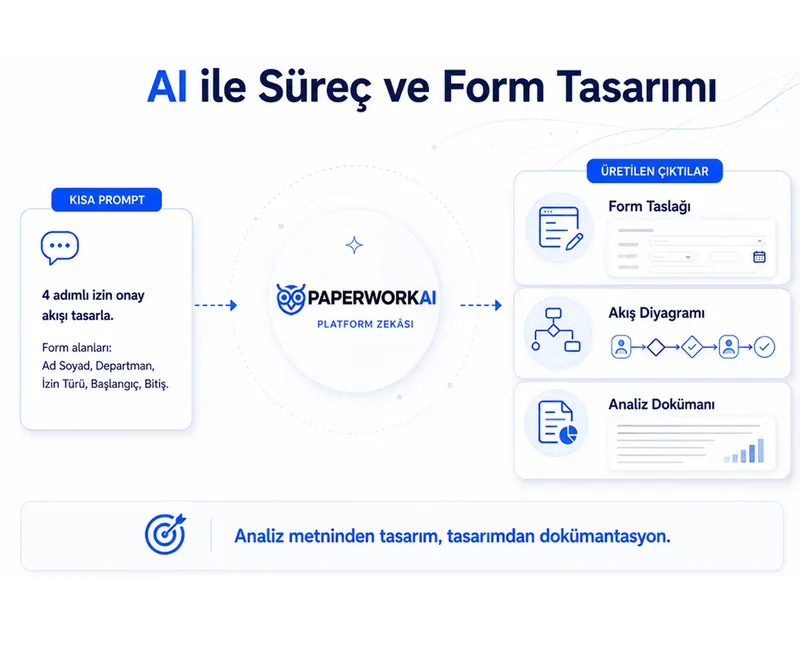
The user states the need; AI prepares; the process moves forward in a controlled way.
What sets PWAI Assistant apart is that it never disconnects AI output from the workflow. Because suggestions, data and actions move within the same process, who did what, which step was approved and where the work is going all remain traceable.
The user states the need in natural language. Work can also start with a document or a process event.
The relevant agent reads the data, identifies options, fills in the form or prepares the analysis result.
The user approves the right option; PaperWork moves the form and process forward according to defined rules.
Example: The system analyzes previously completed work and identifies alternatives that can be applied at that process step. Once the user approves an option, it fills in the form and helps complete the work.
Talk to Your Documents
PWAI Assistant can perform RAG-based question answering over the documents in document management.
Users can ask questions in natural language about contracts, procedures, quality documents, technical reports or policy documents.
PWAI Assistant does not just generate an answer; it can also show the document and related content the answer is based on.
Sample questions
- How many days is the termination notice period in this contract?
- Who is the approver in this procedure?
- How is deviation management defined in this quality instruction?
- What is the executive summary of this report?
The document and related content behind the answer
Instead of adding another screen, agents reduce the load inside your existing work.
The human team spends less time on preparation.
When repetitive tasks such as reading documents, initial data collection, comparison and form preparation are shifted to agents, the team can spend more time on work that requires decisions and handling exceptions.
- Preparation work is done within the process.
- Users see the result and the context on the same task.
- Permission, role, approval and workflow rules keep working.
Trust-Controlled AI Architecture
The PWAI Assistant architecture is built on open-source LLM infrastructures and designed to be controllable according to each organization’s needs.
It can run on-prem or be used through the PaperWork cloud, depending on your needs. Your data and documents do not need to be sent to external systems in an uncontrolled way.
PWAI Assistant keeps security and data control at the center.
Open-Source LLM Architecture
A Transparent, Auditable and Customizable Structure
On-Prem or PaperWork Cloud
Full Flexibility with the Deployment Option That Fits Your Needs
Data Stays Under Your Control
Your Data Stays Within Your Organization and Never Leaves It
Role and Permission-Based Security
Strict Access Control Based on Users, Roles and Permissions
What Does PWAI Assistant Deliver for Organizations?
Faster operations
Lower risk
Smarter decisions
Stronger platform impact
Frequently Asked Questions
What is Platform Intelligence?
Platform Intelligence is PWAI Assistant’s shared intelligence architecture, embedded in PaperWork’s process, document, data, decision and action layers. It is not a separate module or add-on. It draws on standalone AI solutions such as Intelivus, Query Insight and ISDD, and extends this know-how to all platform products such as PWQMS, PWGRC, PWCLM and PWSpend. Instead of learning a separate AI in each solution, users can manage the entire platform in natural language with a single intelligence through Teams and the mobile app.
How is AI used in business processes?
AI is used for document classification, data extraction (OCR), natural language processing, forecasting and decision support. PaperWork’s Query Insight, Intelivus and ISDD modules add an intelligence layer to your business processes. By automating costly manual work, they increase efficiency.
What is Intelivus IDP, the AI-powered document processing solution?
Intelivus IDP is an intelligent document processing solution that understands and processes documents automatically, much like a person would, using our AI’s VLM technologies. HR documents, invoices, contracts, forms and all other kinds of documents are classified, and the critical data inside them is automatically extracted, validated and passed to the related business processes.
Can the AI recognize Turkish documents?
Yes, PaperWork offers Turkish language model support. Turkish invoices, contracts and official correspondence can be classified with AI and their data extracted. Turkish language features are fully localized in the software.
Which languages does PWAI Assistant support?
Along with its Turkish language model, PaperWork supports dozens of language models; invoices, contracts and official correspondence can be classified with AI and their data extracted.
How do I integrate AI into my existing processes?
In PaperWork, AI modules are added to the workflow design with drag and drop. There is no need to run a separate project. Classifying an incoming invoice, the approval workflow and the ERP transfer are defined in a single process, and the system runs automatically.
How can AI automatically mask personal data?
ISDD™ technology automatically detects, masks or encrypts personal data in documents. It supports anonymization, redaction and encryption methods. It is critical for KVKK compliance, and legal requirements are met automatically.
What does Process Intelligence / Process Analytics do?
Process Intelligence analyzes how processes inside the organization actually work, based on data. It makes bottlenecks, delays, repetitive work, unnecessary steps and inefficiencies visible. With PWAI Assistant, these analyses are interpreted, improvement suggestions are generated and, when needed, an alert, action or new workflow can be started.
Can I design forms and processes with AI?
Yes. By describing what you need to PWAI Assistant in natural language, you can create form fields, process steps, approval rules and a workflow draft. This gets process design started faster, clarifies requirements more easily and produces analysis documents in less time.
What can I do with the PWAI Assistant chatbots in Teams and WhatsApp?
With PWAI Assistant chatbots in Teams or WhatsApp, you can view your open tasks, track deadlines, query documents with RAG-based semantic search, start processes such as a leave request in natural language, and take action by going directly to the related task. Users can manage their daily operations faster without logging in to PaperWork.
What is Query Insight and how does it work?
Query Insight is an AI application that performs RAG-based (source-grounded) question answering over file servers, documents and web content. The user asks a question in natural language; Query Insight generates the answer from the relevant sources and can also show the document or content it is based on. This way, answers rest on traceable sources without the risk of hallucination.
Can I use AI products such as Intelivus, Query Insight and ISDD without the PaperWork platform?
Yes. Intelivus, Query Insight and ISDD can work integrated with the PaperWork platform, and they are also positioned as standalone products. For example, Intelivus is also offered to organizations that are not PaperWork customers through its own website (intelivus.ai). Organizations can use these solutions on their own or as part of the PaperWork platform, depending on their needs.
Who developed the PWAI Assistant infrastructure? Is it a third-party AI or your own technology?
PWAI Assistant is a technology developed in-house by PaperWork. PaperWork started its strategic investment in AI in 2021 by acquiring an AI company and has been developing its own AI architecture ever since. PWAI Assistant is built on open-source LLM infrastructures, can be customized to an organization’s needs and is auditable; it does not depend on an off-the-shelf external API.
What happens if the AI makes a mistake when answering (hallucination risk), and how can I trust it?
Especially in document query (RAG) scenarios, PWAI Assistant does not just generate an answer; it can also show the document and related content the answer is based on. This lets users verify the source of the answer. In addition, because the system works with role and permission-based access controls, answers are based only on content the user is authorized to access.
Should I choose on-prem or PaperWork Cloud?
PWAI Assistant can run on-prem or be used through PaperWork Cloud, depending on your needs. On-prem deployment is preferred in sectors such as finance, healthcare and the public sector, where data must not leave the organization and strict compliance with regulations such as KVKK/GDPR is mandatory. If faster rollout and a lower operating burden are the priority, PaperWork Cloud is the better option. The decision depends on the organization’s data policy and regulatory requirements.
Related success stories and articles
 Success story
Gemak Gemi İnşaat starts using PWQMS for quality management
 Success story
İzmir Demir Çelik starts using PWQMS
 Success story
Ayen Enerji Chose PaperWork to Increase Operational Agility and Accelerate Digital Transformation in Its Corporate Processes
 Blog
The Legal Team's New Assistant: One Platform That Reads, Compares, Signs and Tracks Contracts
 Blog
Companies want to speed up work. But do they know where time is lost?
 Blog
Why Contract Management Is No Longer Just a Legal Matter
Put AI to work inside your business.
Let’s explore together which PWAI Assistant expert agents can reduce the preparation and analysis load in your processes.
- 01
We find a time that suits you.
- 02
We hold an introductory meeting.
- 03
We run a demo tailored to you.