
PWSpend: Expense and Travel Management Software Let AI, not people, process your receipts
PWSpend is a mobile and web-based enterprise solution that manages expense approval and travel request processes on a single platform. Developed by DigitalAid on the PaperWork platform, PWSpend runs on PaperWork’s workflow, document management, reporting, authorization, integration and Intelivus AI document reading capabilities.
This makes it more than an expense app: it delivers end-to-end intelligent finance automation that extends all the way to your ERP.
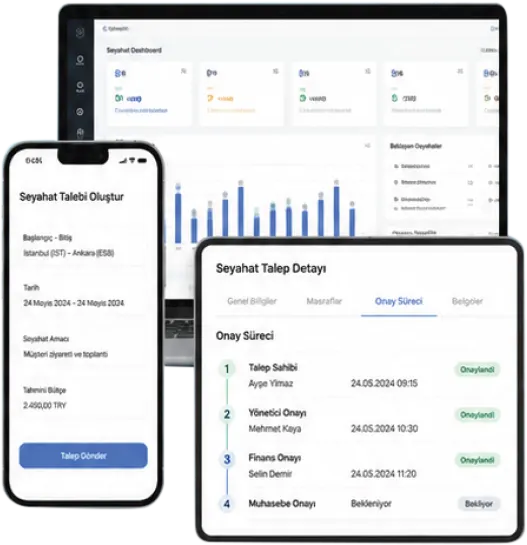
From receipt to payment order
- Photo · The employee uploads it on mobile or web.
- Intelivus · AI reads the data.
- PaperWork · Checks and approvals move forward.
- ERP · The accounting entry and payment order are created.
- Less repeated data entryReceipt data is carried through the entire process.
- Checks before paymentSuspicious records are set aside for review.
- Travel and expenses togetherRequests, spending and approvals are tracked in the same flow.
Turn Manual Operations into Intelligent Operations
Many companies have an ERP. But manual operations still sit in front of it. Receipts are collected, checked in Excel, entered one by one by accounting, cost center errors are corrected and entries are transferred to ERP after the fact.
PWSpend automates this process end to end.
Same Products, Separate Problems
Manual model- Receipts Are Collected1
- Checked in Excel2
- Accounting Enters Them One by One3
- Cost Center Errors Are Fixed4
- Entries Are Posted to ERP5
- Payment Order Is Created6
Your ERP may be powerful, but if data arrives manually, efficiency is limited.
New Model: ERP + Artificial Intelligence
PWSpend- AI Reads the Receipt1
- AI Suggests the Cost Center2
- Approval Workflow Runs on PaperWork3
- ERP Entry Is Created Automatically4
- Payment Order Is Generated5
Accounting moves away from data entry and focuses on control, visibility and auditing.
What Does PWSpend Do?
AI-powered receipt and document reading
Expense approval management
Fraud and compliance checks
ERP integration
Travel request management
Snap a photo. The data is read. The work moves on.
MEAL RECEIPT
Sample document · Customer visit
Employees don’t retype information
Date, amount and tax details are taken from the receipt. Filling in the same lines by hand for the expense entry is reduced.
Expenses are linked to the right place
Travel details and organizational mappings feed the cost center suggestion. The cost center is carried through approval and the ERP entry.
The document stays with the record
The receipt, extracted data and action history are tracked together. During checks, you can see which information came from which document.
If the same receipt comes in twice, keep it away from payment.
Duplicate record
Receipt number and document detailsLimits and policy
Sample company rulesAmount and VAT
500.00 + 50.00 = 550.00 TLApproved expenses go to ERP. Accounting doesn’t re-enter the receipt.
Manager
Reviews the expense and document.
Finance
Evaluates the check result.
ERP
The accounting entry is created.
Payment order
Ready for the payment process.
Accounting entry
550.00 TLMeal expense · VAT: 50.00 TL
Cost center: Sales · Customer visit
Payment order
550.00 TLWaiting for approvals to be completed.
Plan, Approve and Manage Your Business Travel
Digitize the entire process, from travel requests to expense reports, with PWSpend Travel Management.
Enjoy a fast, transparent and auditable travel management experience that complies with your policies.
The travel request, its approval and the expenses on return are tracked together. Employees see the status of their trip without moving information between different lists.
Request before you leave. No chasing receipts when you return.
Request
Route, dates and purpose are entered.
Plan and approval
Flights, hotel and advance are evaluated.
Travel
Receipts are collected on mobile.
Expense closure
Checks, approval and ERP transfer move forward.
Time saved on processing receipts goes to the real work.
- Document
- Receipt photo
- Data
- Intelivus output
- Checks / approval
- PaperWork
- Entry / payment order
- ERP
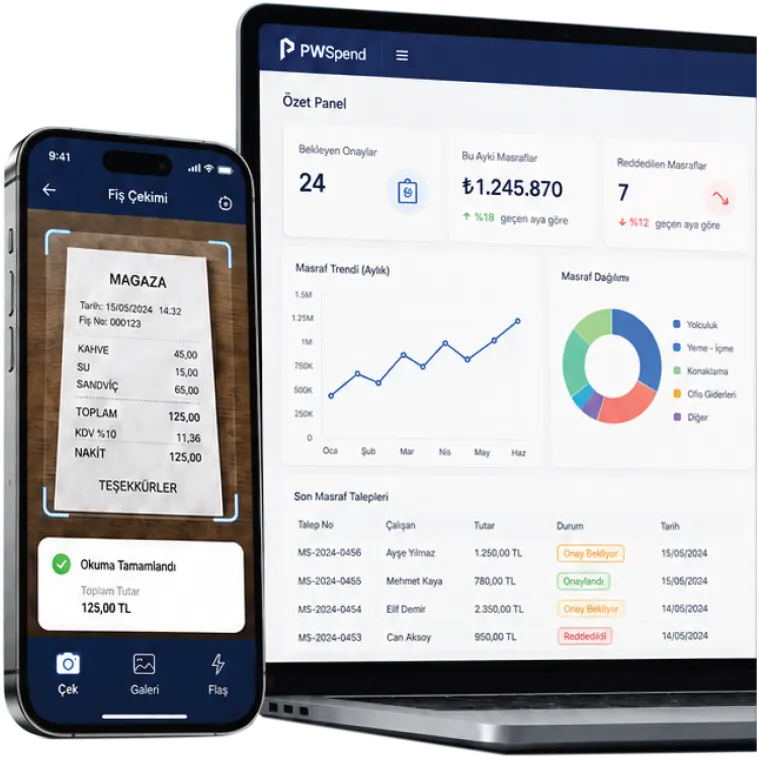
ERP + AI Expense Automation
PWSpend is a mobile and web application for expense approval and travel requests, developed by DigitalAid on the PaperWork platform. It uses PaperWork’s workflow, document management, reporting and Intelivus AI document reading infrastructure.
Because it offers two core functions in a single app, it is extremely user-friendly, simple and easy to use.
- Expense approval and travel requests in one app
- Mobile and web access
- Receipt Reading with Intelivus AI
- End-to-end management from fraud checks to ERP
Stop losing accounting time to receipt entry; let AI read it and let it flow through PaperWork.
Strategic Benefits for the CFO
70–80% Operational Time Savings
Significantly reduce the time spent on manual data entry.
Error-Free Data and Full Auditability
Reduce cost center errors and ensure digital traceability.
Real-Time Expense Visibility
Monitor spending by department in real time.
Business Intelligence as a Natural Part of the Process
Swipe the table sideways to see all columns.
| Manual Process | AI Automation | |
|---|---|---|
| Processing per Receipt | 4–5 Minutes | Within Seconds |
| Error Rate | Risk of Human Error | Dramatic Reduction |
| Data Entry | Manual Excel / ERP Entry | Automatic ERP / SAP Integration |
Secure and Compliant
ERP / SAP Integration
Intelligent Automation with Intelivus AI
Measurable Results
Frequently Asked Questions
What is PWSpend?
PWSpend is a mobile and web-based enterprise solution that manages expense approval and travel request processes on a single platform. It was developed by DigitalAid on the PaperWork platform and uses PaperWork’s workflow, document management, reporting and Intelivus AI document reading infrastructure.
Is PWSpend only for expense management?
No. PWSpend manages two core processes together: expense approval management and travel request management. Employees can enter expenses, upload receipts, create travel requests and track all approval processes in a single app.
Which documents can PWSpend read?
With Intelivus AI, PWSpend can read different document types such as receipts, e-archive invoices, PDFs, taxi receipts, tickets, vouchers and travel documents. The system can automatically extract information such as amount, date, VAT, vendor, category and cost center from the document.
Does the accounting team still have to enter receipts manually?
PWSpend’s core goal is to free accounting teams from manual receipt entry. Documents are read with Intelivus AI, information is extracted automatically, checks are run and approved expenses can be transferred to ERP. Accounting can then focus on control, analysis and auditing instead of data entry.
Can fraud and compliance checks be performed?
Yes. PWSpend can run checks such as duplicate receipts, limit overruns, incorrect VAT, out-of-policy spending, suspicious spending patterns and cost center mismatches according to your organization’s rules.
Does PWSpend integrate with ERP systems?
Yes. PWSpend can be configured to integrate with enterprise systems, including ERP and SAP. Approved expenses can be transferred to ERP with the correct account code, tax information and cost center.
Are travel requests and the expense process linked?
Yes. PWSpend’s AI-supported travel budget approach can create an estimated budget for items such as flights, accommodation, visas, vehicles and advances based on the route, dates and selected services. This lets managers decide with a cost forecast before approving the request.
Can approval processes be customized for our organization?
Yes. Because PWSpend runs on the PaperWork workflow infrastructure, approval chains, limits, expense categories, cost centers, travel policies and task assignments can be configured specifically for your organization.
Can PWSpend be used on mobile?
Yes. PWSpend can be used on both mobile and web. Employees can take photos of receipts and create expense or travel requests; managers can complete their approvals on mobile or web.
Which teams use PWSpend?
PWSpend can be used by different roles such as employees, managers, accounting, finance, HR, administrative affairs, travel planning teams, CFOs and CIOs. Each user only accesses the screens that match their own tasks and permissions.
Does PWSpend run on-premises or in the cloud?
PWSpend can be configured with cloud or on-premises deployment options based on your organization’s needs. Enterprise security requirements such as authorization, logging, digital archiving and audit trails are managed through the PaperWork platform.
What is the most important benefit of PWSpend?
PWSpend manages the entire expense and travel operation on a single platform, from uploading a receipt photo and reading it with Intelivus AI to fraud checks, approval processes, ERP transfer and reporting. As a result, manual data entry decreases, the process speeds up, control gets stronger and visibility in finance operations increases.
Related success stories and articles
 Success story
Gemak Gemi İnşaat starts using PWQMS for quality management
 Success story
İzmir Demir Çelik starts using PWQMS
 Success story
Ayen Enerji Chose PaperWork to Increase Operational Agility and Accelerate Digital Transformation in Its Corporate Processes
 Blog
BlogPaperWork Document Management and Content Server: Bring All Your Documents Together in One Place and Access Them from Any Application
 Blog
BlogSee Risks with PWGRC. Plan Audits Right. Drive Actions to Completion.
 Blog
BlogA New Era in Quality Management with PWQMS: Quality Now Lives in the Field, in the Process and at the Heart of Management
Let’s Make Your Processes Smarter Together!
Let’s explore how PaperWork’s low-code BPM, document management, ERP integration and AI solutions can be used in your organization.
- 01
We find a time that suits you.
- 02
We hold an introductory meeting.
- 03
We run a demo tailored to you.