
Electronic Forms
Move your paper forms to digital. Manage data collection and approval steps on a single screen with the PaperWork electronic forms infrastructure.

Wizard and Integration Features
Form Wizard
Define It in the Wizard, and the Code Is Generated Automatically
The form wizard, a key part of PaperWork's low-code architecture, makes organizations self-sufficient. Users in business development or IT teams perform hundreds of operations through the form wizard by defining parameters, with no coding needed. The need for developers disappears, forms are built faster and error rates drop.
Watch: Low Code - Easily customize forms with the Form Wizard, no coding knowledge required
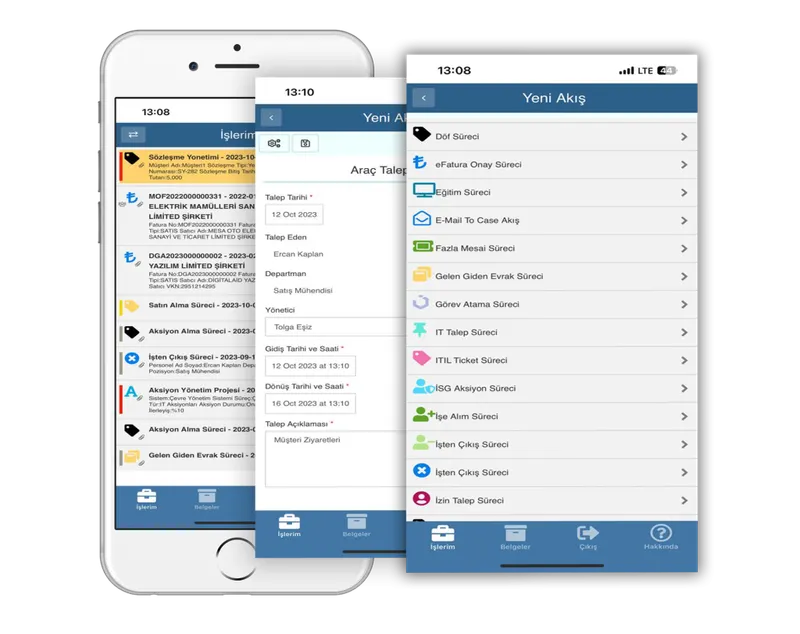
Workflow from Within Applications
PaperWork's workflow application and electronic forms can be embedded in any web or desktop application through the services provided by the SDK. PaperWork's unique integration capability gives organizations flexibility and takes ease of use to the highest level. You can perform process-related tasks directly within your main application without opening PaperWork's web application.
Workflow from Within Outlook
As shown in the example, our workflow application also runs within Outlook. These examples can be multiplied. Similar integrations are possible with various applications such as commercial applications, SharePoint portals and custom-built applications.
Transformation Begins with Smart Forms
The PaperWork Electronic Form Designer brings together simplicity, flexibility and advanced features to streamline your data collection and processing tasks.
Effortless Form Creation
Transform your paper forms and Excel files into powerful data collection applications with our intuitive, no-code Electronic Form Designer. Easily create, customize and deploy forms tailored to your specific business needs.
Transcend Language and Device Barriers
Design simple or complex, multilingual, responsive HTML5 forms that look and work perfectly on any device.
Process Automation
Collect data through automated workflows and trigger specific actions based on the responses. This streamlines your operations while ensuring accuracy and efficiency.
Seamless Integration
Connect your forms effortlessly to create a centralized data hub. Connect to line-of-business systems and data directly from the forms using no-code web service components and integration adapters.
Build, automate, integrate!
The PaperWork Electronic Form Designer is packed with powerful features designed to make your data collection and processing tasks more efficient and effective.
Visual Form Builder
Design forms using our browser-based Form Builder with drag-and-drop components and conditional logic.
Form Wizard
Create complex business rules, pre-fill data fields, connect to web services and maintain data tables with our Form Wizard, no coding required.
Field Validation
Validate responses, add visibility rules and configure event-based actions.
Data Tables
Enhance your forms with a dynamic data table that lets users add, edit, view, filter and sort data efficiently.
Custom Form Logic
Develop your own custom form logic using JavaScript or C# scripting with full PaperWork API access.
Integrations on the Forms
Connect to line-of-business systems and data directly from the forms using no-code web service components and integration adapters.
Form Customizations
Edit CSS, JavaScript and HTML to customize the components, form appearance and behavior.
Global Values
Define system-wide global values, lists, tables and functions to share across processes in a central business rule engine.
Central Code Repository
Create your own custom functions, formulas and scripts to use across all your forms and workflows.
Benefits of Electronic Forms
Create the form you need instantly with drag and drop, customize it and use it on mobile or on the web.
Ease of use
Moving paper forms to digital is easy with drag and drop.
Return
The investment pays for itself within one year.
Accuracy
Raises the accuracy of collected data and reduces the chance of incorrect entries. For example, numbers cannot be entered in the name field of a job application form.
Efficiency
Data collected with forms is stored in the document management system, reported on and sent to the workflow for approval and other actions.
Cost reduction
Shortens processing time, reduces errors and eliminates storage, distribution, sharing and printing costs.
Accessibility
Electronic forms are always accessible. Work can be done from mobile and web environments.
Automation
Data from websites and other enterprise applications is collected into forms automatically.
Design Forms with Drag and Drop
- Form wizard that generates code automatically from parametric definitions
- Customize forms with your colors and logo
- Data entry by copying and pasting from Excel
- Play YouTube videos on the form
- Drag-and-drop form design with a web-based designer offering 100+ ready-made activities
- Perform calculations using data in form fields
- Archive form data on PaperWork Content Server
- Set automatic reminders on date fields
- Attach documents directly to forms
- Create multiple linked forms with tabs
- Write JavaScript code on the electronic form
- Exchange data with ERP systems through connectors, without writing code
- Call every function available in the SDK from the electronic form
- Read and write data from other applications by calling web services from the form
- Call a .NET DLL from the form by passing parameters
- Connect directly to databases such as SQL and Oracle from the form with the database plugin
- Use CSS style files directly within the form designer
- Use the HTML5 responsive forms you design directly in our mobile, Outlook and SAP applications
Watch
Digital transformation in a coffee break: Invoice approval app
Just 30 minutes with PaperWork: Low-code form and process design
How to design responsive forms with PaperWork HTML5 electronic form design
The biggest obstacle to digital transformation: Paper forms
Fault reporting process: Mobile, Outlook and web user interfaces
Frequently Asked Questions
What is an electronic form and how is it different from a paper form?
It is the digital, smart version of a paper form. It offers capabilities such as automatic field validation, conditional visibility, integration with external systems and automatic routing into workflows. The risk of losing paper is eliminated.
In which processes are electronic forms used?
They are used in all kinds of data collection and approval processes, such as leave, procurement, expenses, customer applications, surveys, internal audit checklists and occupational health and safety forms. Almost every business process needs forms.
Do the forms work on mobile devices?
Yes. With responsive HTML5 technology, they adapt to any screen size. Field and remote teams can fill out forms and complete tasks from smartphones and tablets.
Can forms exchange data with ERP/CRM systems?
Yes. They integrate with SAP, Logo and CRM systems. Form fields can be filled automatically from external systems, or entered data can be transferred to the ERP. Two-way synchronization is possible.
Can custom code be used in form design?
Basic use requires no code, but JavaScript and C# are supported for advanced customization. Developers can customize forms for complex calculations and external API calls.
Related success stories and articles
 Success story
Gemak Gemi İnşaat starts using PWQMS for quality management
 Success story
İzmir Demir Çelik starts using PWQMS
 Success story
Ayen Enerji Chose PaperWork to Increase Operational Agility and Accelerate Digital Transformation in Its Corporate Processes
 Blog
BlogPaperWork Document Management and Content Server: Bring All Your Documents Together in One Place and Access Them from Any Application
 Blog
BlogSee Risks with PWGRC. Plan Audits Right. Drive Actions to Completion.
 Blog
BlogA New Era in Quality Management with PWQMS: Quality Now Lives in the Field, in the Process and at the Heart of Management
Let’s Make Your Processes Smarter Together!
Let’s explore how PaperWork’s low-code BPM, document management, ERP integration and AI solutions can be used in your organization.
- 01
We find a time that suits you.
- 02
We hold an introductory meeting.
- 03
We run a demo tailored to you.