Skip to content
Enterprise Task Management and Work Tracking

Task Management and Work Tracking Software: Wherever Work Begins, the Task Starts There

Manage standalone tasks, document actions, workflow work and case tasks from one hub. Clarify responsibilities, never miss a deadline and monitor all work across the organization in real time.

Tasks are managed inside your operations, not in a separate app.

Approval stuck in emailUnclear who has it
Tracking in an Excel listNo one knows if it is current
Work lost in messagesDeadline passes quietly
Action from the fieldMoves on without context
Task
Center
context stays intact
Live task viewSearch tasks, people, documents or deadlines...
  • Customer contract approvalHighPending
  • Nonconformity corrective actionCriticalIn progress
  • Invoice checkMediumAssigned
18delay risk
team workload
  • One hubTasks, documents, comments and activity history are tracked in the same context.
  • Clear trackingOwner, priority, deadline and status become visible.
  • Artificial intelligenceRisk, priority and delay signals are interpreted.
Why do tasks get out of control?

Task chaos rarely comes from bad intent. It comes from scattered tracking.

A piece of work starts in an email, continues as a comment on a document, then someone tries to track it in an Excel list. Before long the team asks the same question: Who has this, when will it be done, and who will notice if it is late?

The work exists, the owner is unclear

When a task is not assigned to the right person, everyone assumes someone is on it, yet no one takes responsibility for finishing it.

The deadline exists, the alert does not

When upcoming and past dates are tracked manually, delays are noticed only when a customer, manager or auditor asks.

The comments exist, the record does not

When documents, decisions, notes and actions live in different places, the history of the work is lost and the same topic is explained again and again.

Why Do Tasks Go Untracked?

Tasks scattered across email, Excel and different applications lead to unclear responsibilities, missed deadlines and loss of control. PaperWork brings all tasks together in one hub, along with their related documents and processes.
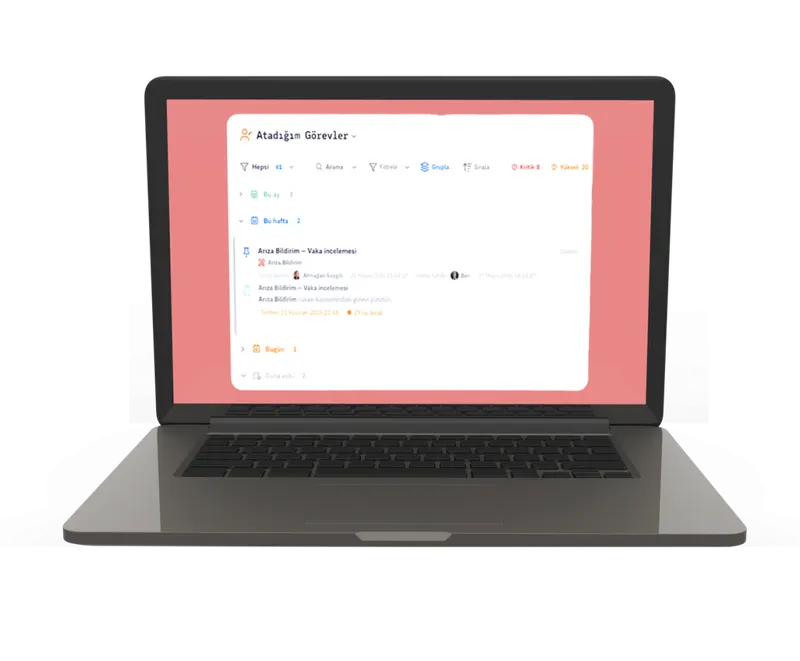
Problems the Task Center solves

  • Tasks getting lost in emails and messages
  • Unclear who will do what
  • Missed deadlines
  • Documents, tasks and comments moving forward disconnected from each other
  • Managers unable to see workload and delays
  • Tasks scattered across different applications
PaperWork Task Center screen showing tasks I assigned
All tasks, one platform

PaperWork never separates a task from where the work began.

The Task Center brings work that originates in different sources onto the same screen. Users see their own priorities; managers monitor team workload, overdue work and critical actions in real time.

Task from a document

Tasks are created from a contract, report, proposal or procedure. Because the task moves together with its document, context is never lost.

Document, task and comments on the same record

Task from a workflow

Additional review, check or completion work within a process quickly becomes a task. While the workflow waits, no action is left without an owner.

Fast action within approval processes

Task from a case

Complaints, incidents, requests and investigations are managed together with the case. Every action is visible within the history of the main event.

Stays connected to case management

Standalone task

Day-to-day work not linked to any record is assigned in seconds. In-department tracking follows the same corporate discipline.

Fast assignment for daily work

System task

When a calendar, rule or process condition is met, the system creates the task automatically and routes it to the right team.

Automatic tracking for recurring work
One screen

When scattered work flows into one screen, tracking changes.

When email, Excel, messages and field notes are tracked separately, the workload stays invisible. The Task Center connects these pieces to the related document, process or case.

Managers then see not only “how much work is there?” but also “which delay would affect operations?”

EmailWork awaiting approval
ExcelManual tracking list
DocumentRevision action
CaseIncident and review
Single Task Centerowner · deadline · priority · history
Core capabilities

Why Task Management?

Standalone Task Assignment

Assign tasks to people or teams without depending on a workflow.

Deadlines and Tracking

See the owner, priority, status and due date of every task.

Instant Notifications

Get notified on assignments, upcoming deadlines, delays and completions.

Consolidated Task View

Filter all tasks by person, team, status, priority and due date.
AI-powered prioritization

See Critical Work and Prioritize It with Artificial Intelligence

PaperWork Task Management does not track tasks by due date alone. Using Process Analytics and platform data, it highlights work that is at risk of delay, has critical impact or creates bottlenecks. The team sees what to look at first, and managers never miss the moment to step in.

  1. 01Risk analysisIdentifies critical tasks and tasks at risk of delay.
  2. 02Smart prioritizationShows which work should be addressed first.
  3. 03Improvement suggestionsPoints to actions that reduce bottlenecks.
  4. 04Root cause insightExplains the causes of delays using Process Analytics data.
Live view for managerslive
42upcoming deadlines
18delay risk
7critical tasks
Delay trendlast 30 days
Team workloadper person

Representative view

Risk visibility

  • CriticalHighest-priority work that requires urgent intervention
  • HighHigh-importance, high-risk work that needs close monitoring
  • MediumWork with moderate risk and impact
  • LowLow-risk work progressing as normal
Task culture across the organization

The Task Center is not for one department, but for everywhere work flows.

Quality, HR, sales, finance, procurement, legal, IT, operations, risk and internal audit teams share the same task discipline. Instead of tracking work in different apps, teams work on the same record, the same deadline and the same history.

Quality and audit

Track the work from finding to action, together with its owner and supporting documents.

Work to track

  • Nonconformity actions
  • Corrective and preventive actions
  • Audit findings
  • Document revisions
Quality and auditSample task
Case-linked taskEvaluate the audit finding
Source
Audit finding
Owner
Quality team
Deadline
Tomorrow, 5:00 PM
Related documents
  • Audit report.pdf
  • Corrective action plan.pdf
Awaiting review

Representative task and document records

What do you gain?

Less follow-up overhead, with every task’s owner and history in view.

The Task Center reduces the small but constant follow-up questions that eat up time across the organization. Who you are waiting on, which work is late and which document a decision is based on are all visible on the same screen.

One task center

All tasks and actions come together on one screen. Users see their own work list, managers see the whole team.

Clear ownership

Every task is assigned to the right person. The owner, due date and status of each task are clearly visible.

No missed deadlines

Reminders and alerts bring upcoming work to the front. When a delay is spotted, taking action is easier.

Corporate memory

Task history is archived. Past decisions, comments and steps no longer depend on individual memory.

The full context in one place

Comments, documents, files, tasks and activity history move forward on the same record.

Single platform approach

Workflow, documents, cases, analytics and artificial intelligence come together on one platform, reducing the need for a separate task app.
Single platform

No Need for a Separate Task App

PaperWork Task Management delivers task management on the same platform as workflow, document management, case management, Process Analytics and artificial intelligence. Tasks are managed without being cut off from where the work began, and no work across the organization goes untracked.

FAQ

Frequently Asked Questions

Can PaperWork Task Management create standalone tasks?

Yes. Users can create tasks directly and assign them to the relevant people without linking them to any process, document or case.

Can tasks be linked to documents and processes?

Yes. Tasks can be created from documents, workflows or cases and are managed in connection with their sources. When a task is completed, the history of the work is preserved as well.

How are overdue tasks tracked?

Reminders can be sent as a deadline approaches, and overdue tasks become visible on manager screens and dashboards.

How is artificial intelligence used in task management?

PaperWork AI interprets task risk, priority, deadline status and the related operational data to provide prioritization and improvement recommendations.
Contact Us

Let’s Make Your Processes Smarter Together!

Let’s explore how PaperWork’s low-code BPM, document management, ERP integration and AI solutions can be used in your organization.

What happens next?
  1. 01

    We find a time that suits you.

  2. 02

    We hold an introductory meeting.

  3. 03

    We run a demo tailored to you.

Request a Free Demo