
Query Insight
The Shortest Path to Your Corporate Memory
In most companies, information is rarely lost. It is just scattered.
Documents on file servers, websites, portals, procedures, user manuals, contracts, training materials and knowledge bases make up an organization's valuable memory. But when this information sits in different places, employees waste time finding the right answer, the same questions get asked again and again, and decision-making slows down.
Query Insight turns the corporate knowledge in websites, portals and document folders into a RAG-based question-and-answer experience. It semantically learns the sources you define, interprets questions to answer them, and shows the sources each answer is based on.
Employees can focus on their work instead of searching for information.
Defined sources
📁 Leave Regulation.pdf🗂 HR portal🌐 Employee handbook
QIQuery Insight
Maternity leave is 16 weeks in total: 8 weeks before and 8 weeks after birth. For multiple pregnancies, 2 weeks are added to the period before birth.Leave Regulation · p.3
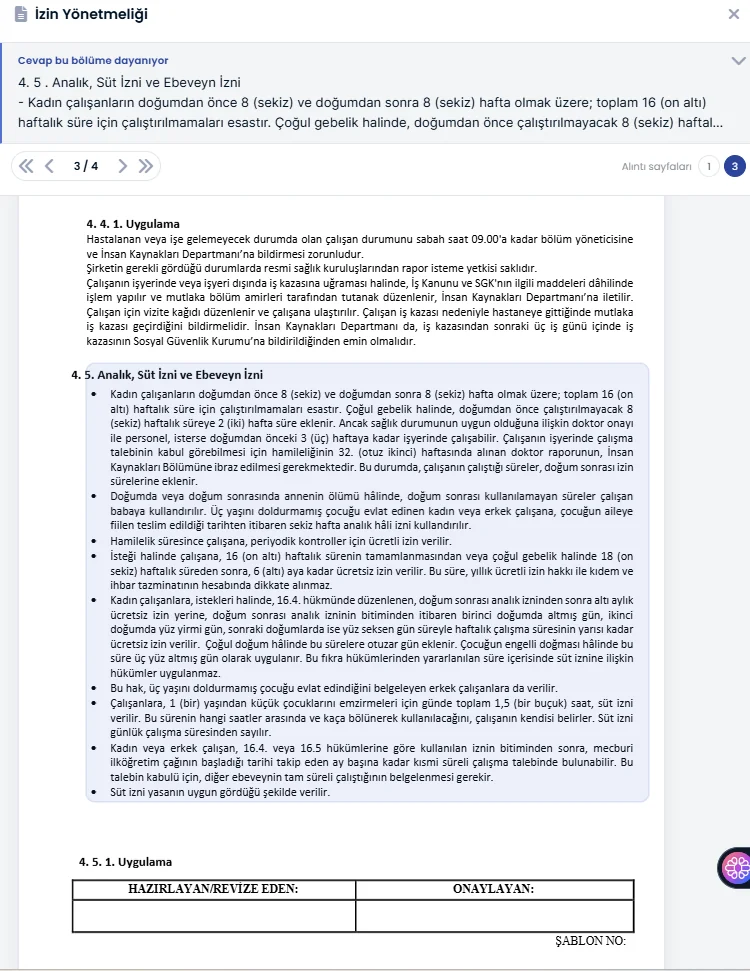
THE ANSWER IS BASED ON THIS SECTION4.5 Maternity, Nursing and Parental Leave · Leave Regulation, page 3
THE JOURNEY OF A QUESTION
Why does a simple question take half an hour?
When employees want to learn a leave rule, the current version of a procedure or the termination notice period in a contract, they first need to figure out where to look. Then they open it, read it, aren't sure and usually end up asking someone. You can follow both paths side by side below.
Today
The information exists, but depends on the person who knows where it is- 1Find the right folder or portal pageFile server, intranet or an email attachment?
- 2Open the document and check whether it is the current versionWhich of three similarly named files is valid?
- 3Find the relevant section and interpret itA single article in a regulation dozens of pages long
- 4When unsure, ask an expertAn HR, quality or legal expert drops their work to answer
- 5Tomorrow someone else asks the same question againThe answer stays in a message no one will find
With Query Insight
The information comes to the person asking- 1Write the question in your own wordsNo need to know keywords or file names
- 2Read the sourced answerThe supporting document appears next to each sentence
- 3Open the document if needed; the relevant section is highlightedChecking takes a single click
Which Problems Does Query Insight Solve?
Challenge
Scattered Information Sources
Corporate knowledge is rarely in one place. Some of it lives on file servers, some on intranet portals, some on websites, and some in PDF, Word, Excel or email content. As a result, employees search across different systems, ask colleagues, or end up working with outdated documents to find the right information.
Query Insight brings this scattered information together in a single intelligent knowledge layer.
Challenge
Time Lost Finding Information
Finding a procedure, a leave rule, a technical document, product information or a contract clause is rarely a simple search. Employees first have to find the right folder, then open the right document, then read and interpret the relevant section.
Query Insight shortens this process. Users ask their question in natural language; the system evaluates the relevant sources and produces a clear answer.
Challenge
Repetitive Support and Information Requests
HR, quality, legal, procurement, customer service and technical teams often answer the same questions over and over: “How many days of leave am I entitled to?”, “When does this procedure apply?”, “What are the technical specs of this product?”, “Where does this contract state the termination period?”, “Which is the current version of this instruction?”
Query Insight reduces these repetitive information requests and lets expert teams spend their time on more valuable work.
Challenge
Lack of Trust in Answers with Unclear Sources
In enterprise knowledge management, getting an answer is not enough. You also need to see where the answer came from. Query Insight shows the sources behind the answers it generates. Users can see which document, web page, portal content or folder file an answer is based on.
This makes answers not only fast but also verifiable and reliable.
Challenge
Risk of AI Hallucination
General-purpose AI tools sometimes present information that is not in the source as if it were. In business processes, this is a serious risk. Query Insight generates answers based only on the defined sources. If the sources do not contain enough information, it does not make up an answer; it clearly states that it does not know.
This approach is a major advantage in areas where accuracy is critical, such as quality, legal, compliance, HR and technical operations.
Why Query Insight?
Because companies no longer just need to store more documents. What they really need is fast, reliable and source-backed access to the information inside those documents.
Query Insight turns your corporate knowledge from content you search into a structure that answers.
Wherever your information is, Query Insight makes it accessible, interpretable and reliable.

Let Your Knowledge Sources Talk with Query Insight
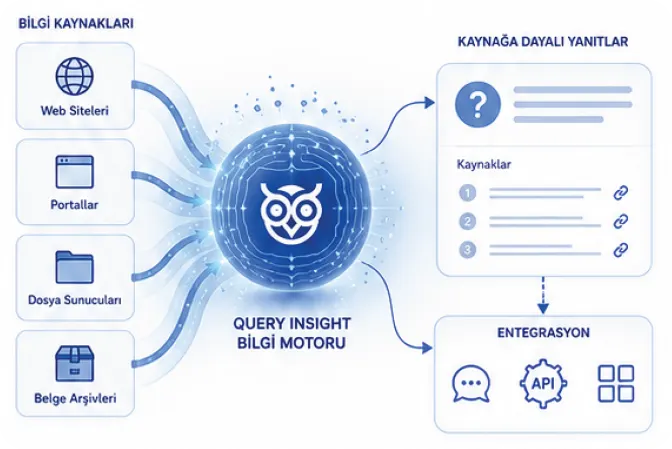
Websites, portals and document folders become accessible knowledge sources of your corporate memory.
Query Insight semantically learns the digital sources you define, interprets questions to answer them, shows the sources each answer is based on, and speeds up access to information.

Websites
Crawls internal or external web content, learns the page content and uses it as a knowledge source for questions.

Portals
Reads information from HR, quality, intranet and operations portals to give employees fast access.

Document Folders
Uses PDF, Word and similar documents in file server folders as sources.
HOW IT WORKS
Point to the source, let the system do the reading.
Setup does not require moving documents or building a new archive structure. You define where the information lives today. Tap the steps to see what happens at each stage.
INSIDE THE SCREEN
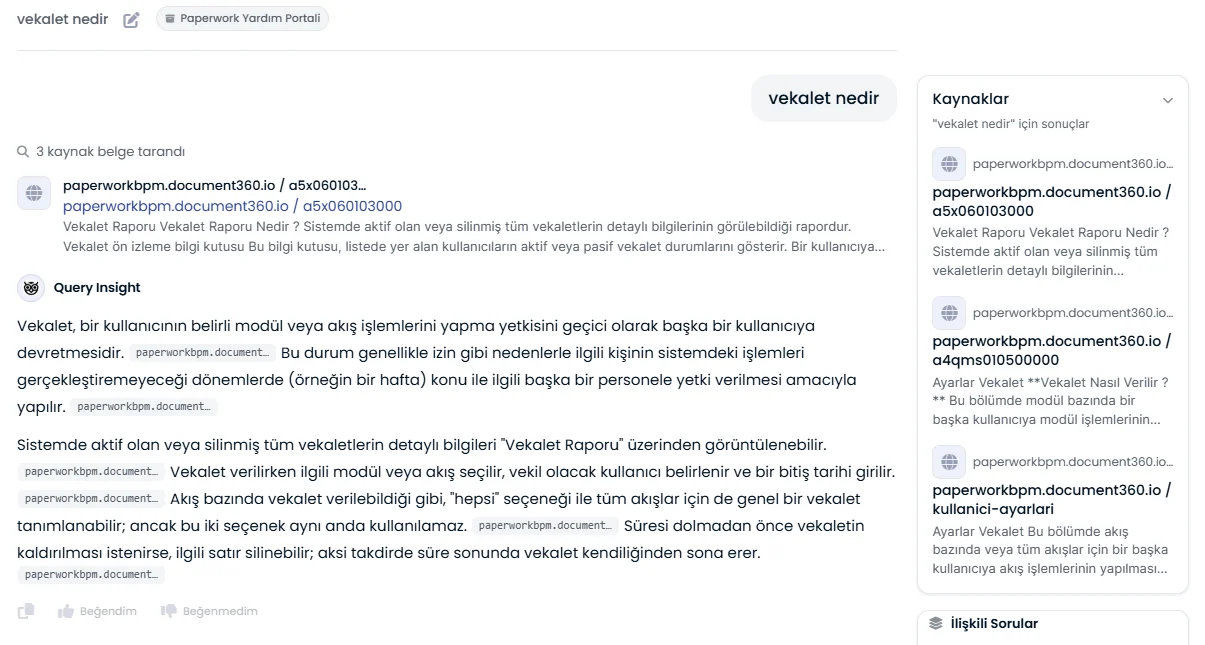
Let's read a real answer together.
The images below are taken from Query Insight itself. The highlighted area moves along with the description on the right; click a step to jump straight to it.
1
5
The images are screens of Query Insight running on the PaperWork help portal and sample HR processes.
A HALLUCINATION-FREE APPROACH
An assistant that can say "I don't know".
In a corporate decision, the most dangerous answer is the one that is confident but wrong. Query Insight only speaks from the sources you define.
- When a question has no match in the sources, it does not guess; it says so clearly.
- A missing topic also shows which document should be added to the system.
- In areas where wrong information is costly, such as quality, legal, compliance and HR, trust comes from this behavior.
General-purpose chat toolQuery Insight
Can I use the company car for personal errands on the weekend?
NO SOURCE, FULLY CONFIDENTYes, most companies allow weekend use. You just need to cover the fuel costs yourself.
TIED TO THE SOURCEI couldn't find a rule on weekend use of company cars in the defined sources. The vehicle use policy may not have been added to the system; I recommend checking with the administrative affairs unit.
WHAT IT DOES FOR EACH DEPARTMENT
Every department has its own "most asked" list.
The same infrastructure works with the documents of different departments. Choose a department or let the animation cycle through them.
Content used as sourcesThe team that gets relief
Sample questionWhat's in Query Insight's answer?
EXPERTS' TIME
Let questions go to the source first, not the expert.
Most incoming questions already have their answer written in a document. Query Insight answers these from the source; topics with no match in the documents or that require interpretation stay with the expert. The flow below is a representative slice of a day.
Incoming questions
From HR, quality, procurement and support channelsBeing evaluated now
↓
Answered by Query Insight
Sourced answer with document linkLeft to the expert
No match in the documents, or a decision is neededWhat Does It Offer Companies?
Speeds up access to information
Employees no longer need to know which file, folder or portal page to search. They ask their question in natural language and quickly get a source-backed answer.
Makes corporate memory accessible
Documents, procedures, contracts, manuals and web content built up over the years are no longer just stored files. Query Insight turns this content into a living knowledge source employees can use.
Reduces support workload
Repetitive internal support, procedure, product information, HR and operations questions can be answered through Query Insight, reducing the operational load on support teams.
Improves decision quality
Teams that reach the right information quickly make faster and safer decisions. Being able to see the source of an answer builds trust, especially in critical decision processes.
Keeps knowledge from depending on individuals
In organizations, important knowledge often stays in certain people's experience, team folders or past correspondence. Query Insight makes this knowledge accessible within authorization limits, so corporate memory no longer depends on individuals.
Works with PaperWork or on its own
Together with the PaperWork Document Management infrastructure, Query Insight delivers a powerful enterprise knowledge management experience. It can also be deployed as a standalone RAG-based question-and-answer application.
It can be used through services from chatbots, web portals and other enterprise applications.
DEPLOYMENT AND INTEGRATION
You decide where your data stays.
Query Insight can be installed on-premises or used in the cloud. It works together with PaperWork Document Management and can also be deployed as a standalone application.
On-prem
Runs on your organization's servers. Documents and questions never leave the company environment.
Cloud
Can be used through AI servers at Bulutistan, without setting up infrastructure.
With PaperWork or standalone
Delivers a powerful knowledge management experience together with document management; it also works on its own.
Everywhere via API
Added to chatbots, web portals and enterprise applications through services.
FAQ
Frequently Asked Questions
What is Query Insight?
Query Insight is a RAG-based question-and-answer application that learns from the digital sources an organization defines. Users ask questions in natural language; the system generates the answer from the relevant sources and shows the sources the answer is based on.
What problem does Query Insight solve?
It makes scattered corporate knowledge accessible. It turns information on file servers, portals, websites and documents into a structure employees can easily query.
Which sources can be used?
Websites, portals, document folders on file servers, PDF, Word and Excel files, procedures, contracts and user manuals can be used as sources.
Does it show the sources of its answers?
Yes. Query Insight shows which sources its answers are based on, so users see not only the answer but also the document or content behind it.
What happens if a question is asked that is not covered by the sources?
Query Insight does not make up answers for information that is not in the sources. If there is not enough information, it clearly tells the user.
How is Query Insight different from a traditional search engine?
Traditional search engines return a list of results. Query Insight understands the question, evaluates the relevant sources, generates an interpreted answer and shows its sources.
Does it work with PaperWork?
Yes. It can be used together with the PaperWork Document Management infrastructure. It can also be deployed as a standalone solution.
Can it be used within a chatbot or portal?
Yes. Query Insight can be integrated into chatbots, web portals and enterprise applications through API services.
Can it run on-premises?
Yes. Query Insight can run on-premises, so corporate data stays within the company environment. If needed, it can also be used through AI servers in the cloud.
Which departments can use it?
HR, quality, legal, procurement, customer service, technical support, operations, training and management teams can all benefit from Query Insight.
Contact Us
Let’s Make Your Processes Smarter Together!
Let’s explore how PaperWork’s low-code BPM, document management, ERP integration and AI solutions can be used in your organization.
Call us(+90) 216 384 0751
What happens next?
- 01
We find a time that suits you.
- 02
We hold an introductory meeting.
- 03
We run a demo tailored to you.