Why this guide?
In most companies the problem isn't a lack of software. There is an ERP, a CRM, an HR system, and email and Excel are everywhere. The work, however, gets stuck between these systems: an invoice waits in an inbox, nobody is sure who should approve it, the latest version of the contract is in some folder, and the related complaint is on another screen.
This guide is written for organisations that want to bring that in-between work onto a single platform. It explains what process automation, document management, business intelligence, process analytics, case management and the development layer do, how they connect, and what to look for when choosing a platform.
Who it is for: operations and process managers, IT teams, managers of document- and approval-heavy units such as finance, procurement, legal, quality and HR, and decision makers about to start a digital transformation project.
What is the one-platform approach?
A single platform doesn't replace existing systems. The ERP keeps the accounts and the CRM keeps the customer records. The platform manages the work that sits between them: approvals, documents, tasks, cases, rules and how all of these are measured.
What makes the difference is that every component shares the same foundation:
- One data model: a request, its documents, its approval history and the related case are linked to the same record.
- One permission model: users, roles and the organisation chart are defined once, and every module works with the same rules.
- One task list: employees see all their work on one screen, whatever process it comes from.
- One AI layer: document reading, classification and assistant capabilities are used through the same service in every process.
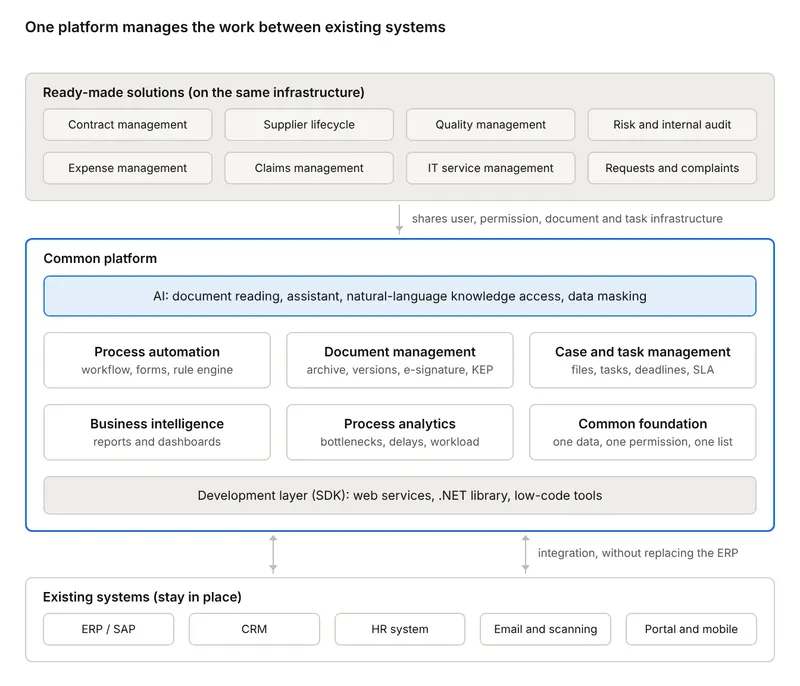
Ready-made solutions sit at the top and share the user, permission, document and task infrastructure that the common platform provides. The platform talks to existing systems through the development layer; those systems stay in place.
1. Workflow and process automation
Process automation defines who a piece of work passes to, in what order and under which rules. Repetitive work such as leave requests, purchase approvals, invoice approvals and employee onboarding and offboarding moves out of email traffic and becomes traceable.
What a good process engine should have:
- Visual design: processes are drawn with drag and drop in a BPMN 2.0 compliant editor. Roles are shown as swimlanes, so the business unit can read the process with its own eyes.
- Rich step types: human approval, decision (branching on a condition), parallel branches and joins, sub-flows, waits, email and SMS notifications, automatic numbering, generating PDFs from documents, web service calls and running ERP functions.
- Flexible task assignment: a fixed person, the requester's manager, the person who completed the previous step, a group (first come first served, or balanced by workload) or a person determined by a field on the form.
- Organisation chart and calendar: the management chain is read from the chart, and durations are calculated with the organisation's working hours and holidays.
- Duration and target tracking: each step gets a target duration and a tolerance. For example, a 10-minute target with 20 percent tolerance means up to 8 minutes is early, up to 12 minutes is on time, and anything after that is late.
- Delegation, priority and error handling: the work of someone on leave passes to their deputy. Urgent requests are flagged as priority. A step that fails goes to the responsible person and is rerun from where it stopped.
- Versioning: when a new version of a process goes live, flows started on the old version continue without interruption.
Electronic forms. Each step can have its own form. Besides basic fields such as text, date, currency and lists, components such as Turkish ID number, IBAN, barcode, QR code reader, photo, location and editing a Word document inside the form can be used. Behaviours such as show/hide, make required and calculate are defined with a wizard, without code. Forms can be multilingual.
Rule engine. Frequently changing rules such as approval limits, authority matrices and discount rates are not buried inside the process. They are kept in a central rule engine as Excel-like decision tables. When an approval limit changes, only the table is updated, without touching the process.
What the user sees. Employees see work from all processes in a single task list. Colours show priority, delays and errors. The same task can be approved on the web, in the mobile app and in Outlook.
2. Document management
Document management is different from keeping documents on a file server. Every document is tied to a type, a permission and a process. That way a document answers not only "where is it?" but also "which job does it belong to, who can see it, which is the latest version?"
Basic building blocks:
- Archives and document types: each document type, such as an invoice, contract or personnel document, has its own metadata fields. These fields are filled in on upload and used for searching later.
- Smart files (file cards): digital files carrying a ready folder template for an employee, customer or project. All of an employee's documents appear on one screen.
- Dynamic folders: they are not created physically but form instantly from document metadata. For example, e-invoices arrange themselves by year, month and day.
- Missing document tracking: a health report expected at onboarding, or a contract that has expired, is flagged as a missing document and reported.
- Versioning: a document is checked out for editing and saved as a new version after the change. Old versions are not lost.
- Full-text search: search runs across document content and metadata at the same time, and searches can be saved.
- Permissions and audit trail: who viewed, downloaded or deleted a document is recorded. Deleted documents can go to a recycle area subject to approval or a retention period.
- Collaboration on documents: people can message each other on a document, folder or file, and the conversation is stored with the document.
Regulatory and security requirements. For organisations operating in Türkiye, these components matter:
- Storing the e-invoice XML together with its visual, and connections to e-invoice integrators
- Electronic signature and bulk signing in line with Law No. 5070
- Sending via KEP (registered electronic mail), which has the status of legal evidence
- Automatically detecting personal data and showing it masked to unauthorised users (KVKK and GDPR compliance)
High-volume document units. In units such as the mail room, smart archiving components that split bulk-scanned documents by page or blank page, index them and place them in the right folder save a great deal of time.
3. Business intelligence and reporting
The business intelligence layer turns the data that builds up in processes and documents into reports and dashboards a manager can read. The advantage of having it inside the platform is that the data doesn't need to be moved: form fields, approval times and document metadata are already in the same database.
- Data sources: defined without code in design mode or with SQL. The same source is used both in list reports and in dashboards.
- Report design: formatted reports are built in an editor resembling the Office ribbon and exported to Excel.
- Dashboards: dashboards for units or teams are built from cards such as numeric indicators, progress bars, query results and embedded web pages. For example, a team scorecard shows the delay rate, completed work and the number of jobs opened and closed over the last 12 months at a glance.
- Scheduled reports: a report is sent automatically to a person or group at set intervals.
- System reports: audit and management reports such as flow statistics, target duration measurement, delegation, viewed and deleted documents, user permissions and integration calls come ready-made.
Reports, like every other object, are subject to permissions. Everyone sees only the data they should see.
4. Process analytics (process intelligence)
Business intelligence answers "what happened?". Process analytics focuses on "why is the work slow, and where does it get stuck?". How long each flow waited at which step, who handled it and where it was sent back are already recorded. Process analytics reads these traces and makes the invisible visible.
Questions it answers:
- Bottleneck: which step consumes the largest share of the average duration?
- Delay: which requests exceeded their target time, and is the delay concentrated in a particular unit or amount range?
- Workload imbalance: is work piling up on some people in a group while others sit idle?
- SLA deviation: how often is a promise to a customer or internal unit not kept?
- Rework and returns: at which step are requests frequently sent back, and where does the missing information come from?
Why a separate layer? Classic reports list individual records. Process analytics looks at flows as a whole and bases improvement decisions on data. For example, if it turns out that two thirds of the approval time is spent at a single approval level, the limit rule for that level is changed or a deputy is defined. The effect of that change is then measured on the same screen.
5. Case and task management
Not all work fits a process drawn in advance. A customer complaint, a claim file, an internal audit finding or a legal dispute changes shape as it progresses. Who needs to be involved and which steps will be needed aren't clear at the start. Case management is for this kind of work.
The difference between a process and a case:
| Process (workflow) | Case | |
|---|---|---|
| Structure | Steps and order are known in advance | Steps are added as the situation requires |
| Example | Leave request, invoice approval | Complaint, claim file, audit finding |
| Central object | The flow | The file: documents, tasks, correspondence, history |
| Measure of success | Step durations | Resolution time, SLA, customer satisfaction |
What to look for in a case management layer:
- All documents, notes, correspondence and decisions of the case gathered in one file
- Opening tasks from within the case, assigning an owner and a deadline, and starting a defined approval process when needed
- Requests from email, a portal or a call centre turning into cases automatically
- Tracking SLA times and notifying the next level when they are exceeded
- Seeing past cases for the same customer, supplier or contract with one click
Task management is the common denominator of processes and cases. An action agreed in a meeting, the fix for an audit finding or a sub-task of a case is tracked in the same task list with its owner and deadline. A manager sees the team's open work, delay rate and completion trend on one dashboard.
6. Development layer (SDK), low-code and integration
This is the layer that gives a platform a long life. When business needs change, it should be possible to build on the same foundation instead of buying a new product every time.
Three levels of development:
- No-code: a business analyst defines the data structure, generates the form automatically from it, draws the process with drag and drop and publishes it. A simple approval process goes live in hours rather than days.
- Low-code: form behaviours are defined with a wizard and business rules with decision tables. Where needed, small pieces of code are added in JavaScript on the form and C# in the process.
- Full development (SDK): all of the platform's business logic is exposed through SOAP and REST web services and a .NET library. The platform's own screens run on this layer too. So the organisation's software team can do everything the platform can do from its own application: upload documents, start flows, complete tasks, search.
Integration options:
- ERP: calling SAP functions (BAPIs and custom functions) and local ERPs such as Logo from processes and forms without code. For SAP users, a document archive that sits inside SAP screens as well.
- Web services: external systems' SOAP and REST services are defined, tested and used in a process step with field mapping.
- RPA: software robots for legacy applications without an interface are triggered from the process.
- Identity: Active Directory synchronisation, single sign-on (SSO) and multi-factor authentication.
- Communication channels: an Outlook add-in, a mobile app, and querying tasks and starting requests via Teams and WhatsApp.
- External stakeholder portal: a supplier or business partner completes a step of the process from their own portal.
Deployment and migration. The platform should be able to run in the cloud or on premises. Being able to move processes, forms and reports prepared in the development environment to production as a single package makes change management easier.
7. The AI layer
When AI stays in a separate chat window, its benefit is limited. The value appears when what AI produces is tied to a process, a task or a decision. In an AI layer embedded in the platform, look for these capabilities:
- Intelligent document processing: it reads documents such as invoices, delivery notes, contracts and ID cards, classifies them, extracts the critical fields and starts the related process. For a new document type, you upload a sample document and describe the fields you want; the system proposes the definition itself.
- Corporate assistant: it understands documents and processes, produces summaries and risk suggestions, and starts flows or creates tasks on the user's behalf. You can ask "what approvals are waiting for me?" via Teams or WhatsApp.
- Natural-language access to corporate knowledge: you ask questions about policies, procedures and archive documents. The answer comes with its source and within the user's permissions.
- Sensitive data detection and masking: personal data such as Turkish ID numbers, IBANs and phone numbers is found automatically and shown masked to unauthorised users.
- Designing with AI: the business unit writes its need in a sentence (for example, "two-level approval for purchase requests"), and form fields, roles and a draft flow are generated automatically.
A point to watch: the AI layer should work within the platform's permission model. The assistant should never produce an answer from a document the user isn't authorised to see.
How do the layers work together?
The real value of the layers shows not in their individual features but in how they work together on the same piece of work. Two examples:
Scenario 1: An incoming supplier invoice
- The invoice arrives by email, from a scanner or from the e-invoice integrator. (Document management)
- AI reads the invoice and extracts the supplier, amount, tax and line items. (AI)
- The data is validated against the order and supplier record according to rules. (Rule engine)
- An approval flow starts for the right people based on amount, company and cost centre. (Process automation)
- The approved invoice data is transferred to the ERP, and the document is archived in the relevant supplier file. (Integration and document management)
- Waiting times and bottlenecks are monitored on the analytics screen. (Process analytics and business intelligence)
In organisations that set up this structure, invoice approval time typically drops from weeks to days, and paper printouts made for approvals largely disappear.
Scenario 2: When a supplier's performance drops
In a periodic supplier evaluation, a supplier's score falls below the threshold. With separate systems, this information stays in a report. On a shared infrastructure, the same event sets several areas in motion:
- On the quality side, a corrective action is opened.
- On the risk side, a supplier risk is recorded.
- On the contract side, penalty and termination clauses are sent to legal for review.
- All actions are tracked with their owners and deadlines in the same task list and the same report.
Because the supplier record, permissions and documents are shared, no separate integration project is needed for this connection.
Ready-made solutions on the shared infrastructure
You don't have to build every process from scratch. Ready-made solutions developed on the same platform and development layer bring the best practices of a particular business area out of the box. They are adapted to the organisation's own rules with low-code tools.
| Business area | What it manages | Priority for |
|---|---|---|
| Contract management | The contract lifecycle from drafting through approval, signature, obligation tracking and renewal; clause and risk analysis with AI | Legal, procurement, contract-heavy companies |
| Supplier lifecycle | Supplier applications, evaluation, performance scoring and a supplier portal | Procurement, supply chain |
| Quality management | Nonconformities, corrective and preventive actions (CAPA), audits and action tracking | Manufacturing, food, pharmaceuticals, quality units |
| Risk and internal audit | Risk inventory, controls, audit plans, findings and actions | Internal audit, risk, compliance |
| Expense management | Expense claims, travel requests, advances and settlement | Finance, field teams |
| Claims management | Documents, adjusters and payment for a claim file from opening to closing | Insurance, companies managing fleets and assets |
| IT service management | IT requests, incident and service processes, asset inventory | Information technology |
| Customer request and complaint management | Managing requests and complaints as cases, resolution times, service performance | Customer service, after-sales |
| Document management inside SAP | Accessing and archiving documents without leaving SAP screens | Organisations using SAP |
What the shared infrastructure brings. Ready-made solutions are not standalone applications. Each can be deployed on its own. But when a second or third solution is added, users, roles, the organisation chart, integrations, document classes, business rules, reports and AI services are reused. In practice this means:
- No separate licensing infrastructure, user management or integration project is needed for each new solution.
- Employees don't learn different screens; all their work lands in the same task list.
- An event in one area can trigger other areas (Scenario 2).
- There is one roadmap: a new capability added to the platform reaches every solution built on it.
In addition, dozens of ready process templates for HR, finance, operations, quality, occupational health and safety, procurement and sales (leave requests, advances, staff requests, near-miss reports, fault tracking, incoming and outgoing correspondence, quote approval and more) can be used as starting points.
Questions to ask when choosing a platform
In sales presentations every platform looks similar. The difference shows in the answers to the questions below. You can use the table as a checklist in evaluation meetings.
| Area | Question to ask | Why it matters |
|---|---|---|
| Architecture | Do processes, documents, reports and cases use the same data and permission model, or are separate products wired together? | Separate products create integration costs with every new need |
| Existing systems | Can it work without replacing the ERP? Are there ready connectors for SAP and local ERPs? | The number of systems that must change determines the project's risk |
| Development | Can a business analyst build a process without code? When needed, can the software team access everything through an SDK? | You need both speed and flexibility; if one is missing, you get either dependency or a ceiling |
| Rules | Can approval limits and business rules be changed without touching the process? | Rules change more often than processes |
| Regulation | Are e-invoice, e-signature, KEP and KVKK masking supported? | In Türkiye, document processes can't be completed without these requirements |
| Measurement | Are step-level target durations, bottleneck and workload analysis inside the platform? | A process that isn't measured can't be improved |
| AI | Can an AI result be tied to a process or a task? Does it respect the permission model? | AI that isn't connected stays at demo level |
| Deployment | Are cloud and on-premises options available? Where is the data kept? | It is decisive in regulated sectors |
| User experience | Can approvals be given via mobile, Outlook and Teams? | Approvals don't wait at a desk |
| Growth | Can a second and third business area be added to the same infrastructure? Are there ready solutions and templates? | If the first project succeeds, demand grows quickly |
| References | Is there live use in your sector, at a similar scale? | The most reliable proof is a working example |
Rollout roadmap
One-platform projects give the best results when they start small and grow on the same infrastructure. The suggested order:
- Discovery: list your document- and approval-heavy processes. For each one, note the monthly volume, average duration, the units involved and how many systems it touches.
- Choosing the first process: start with a process that has high volume, clear rules and measurable results. Invoice approval, purchase requests and leave processes are common starting points.
- Core setup: take users from Active Directory and define the organisation chart, working calendar and permission sets. This is done once, and every later process uses it.
- Taking the first process live: set up the form, flow, rules and ERP connection. Give steps target durations so you start measuring from day one.
- Measure and improve: use the first few weeks' data to find bottlenecks and update rule and assignment settings. Report the result to management in numbers.
- Roll out: add the document archive, the second and third processes, and then ready-made solutions such as contract, quality or supplier management to the same infrastructure.
- Connect AI: add document reading, assistant and masking capabilities on top of established processes. Clean processes and an orderly archive are prerequisites for AI to work correctly.
How do you measure success? Approval time, the share of work exceeding its target time, the number of paper printouts, the number of lost or missing documents and pending work per user are the key indicators to measure at the start of the project and at every stage.
Frequently asked questions
Does a single platform mean we have to replace our ERP? No. The ERP remains the owner of financial records and master data. The platform manages the work around the ERP, such as approvals, documents and tasks, and passes the results to the ERP.
What is the difference between BPM and case management? BPM is for repetitive work whose steps are known in advance. Case management is for document- and correspondence-heavy work whose flow takes shape as the situation develops. In a good platform, a defined process can be started from within a case.
If we have business intelligence, why do we also need process analytics? Business intelligence reports results. Process analytics shows how the work breaks down: at which step it waits, on whom it piles up, where it is sent back.
Can a team that doesn't code build processes? Yes. The data structure, forms and processes are designed without code, and form behaviours are defined with a wizard. For more complex needs, the software team uses the low-code tools and the SDK.
What is the SDK for? It exposes all of the platform's business logic through web services and a .NET library. The organisation's own applications, portals or custom screens talk to the platform through this layer. Because ready-made solutions are developed on the same layer, they naturally work with each other.
Can we adapt ready-made solutions to our own processes? Yes. Forms, flows, rules and reports can be changed with low-code tools to fit how the organisation works. A ready-made solution is a starting point, not a mould.
Does AI use our sensitive data safely? AI inside the platform should work according to the user's permissions. Personal data can be detected and masked automatically, and with the on-premises option the data can stay on the organisation's own infrastructure.
How long does it take to take a process live? It depends on the complexity of the process and the integration needs. A simple approval process with a ready template and no ERP connection can go live in a short time. Because the core setup is done once, later processes speed up noticeably.
Would you like to see PaperWork in your organization?
Request a Demo